Link Accounts
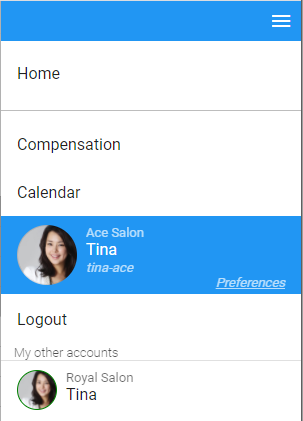
If you have multiple Rewanow user accounts, you can link them together so that you can switch between them quickly without having to logout and relogin every time. After linking, all your accounts will be listed in the system menu. To switch to an account, just simply tap on it
This feature is commonly used by owners who have multiple businesses. They have an owner account in each of those businesses and need to switch between those accounts to manage them
How to setup
Let's say Tina has two accounts: tina-ace with Ace Salon and tina-royal with Royal Salon. Tina first needs to login to one of her accounts, tina-ace. Then open the system menu and tap on Preferences to open her Account Settings screen. In the Account Settings screen, tap Add button in Linked Accounts section, then enter her second account's user name, tina-royal, and password (to prove that account really belongs to her).
Repeat the above steps if she have more accounts. Tap on Home in the system menu when done
From now on, she can quickly switch between her accounts by tapping on them in the system menu
How to unlink an account
Go back to the Account Settings screen and tap on the Remove button on the account you want to unlink